


NEW Keep control of payroll. Lose the workload. See how it works
Most payroll systems can tell you what an employee earned. Fewer can tell you what a specific job, client, or placement actually cost in labor.
The gap between those two questions is where finance and ops teams spend a lot of their reconciliation time. Spreadsheet exports, manual matching, and billing delays are all symptoms of the same structural problem: payroll data that's attached to workers, not to work.
Solving it requires a specific capability inside your payroll system. This post explains what that capability looks like, what to evaluate in a solution, and how Greenshades handles it.
Direct answer
Transaction-level payroll tracking means attaching identifiers — like a job ID, client name, or placement number — to each individual earning within payroll, rather than just to the employee.
This gives finance and ops teams the ability to report, search, and bill based on the specific work behind each dollar of labor cost, without manual reconciliation after the fact.
Not every payroll system can do this. Before evaluating options, it helps to know exactly what the capability requires. There are three things that have to be true for transaction-level tracking to actually work.
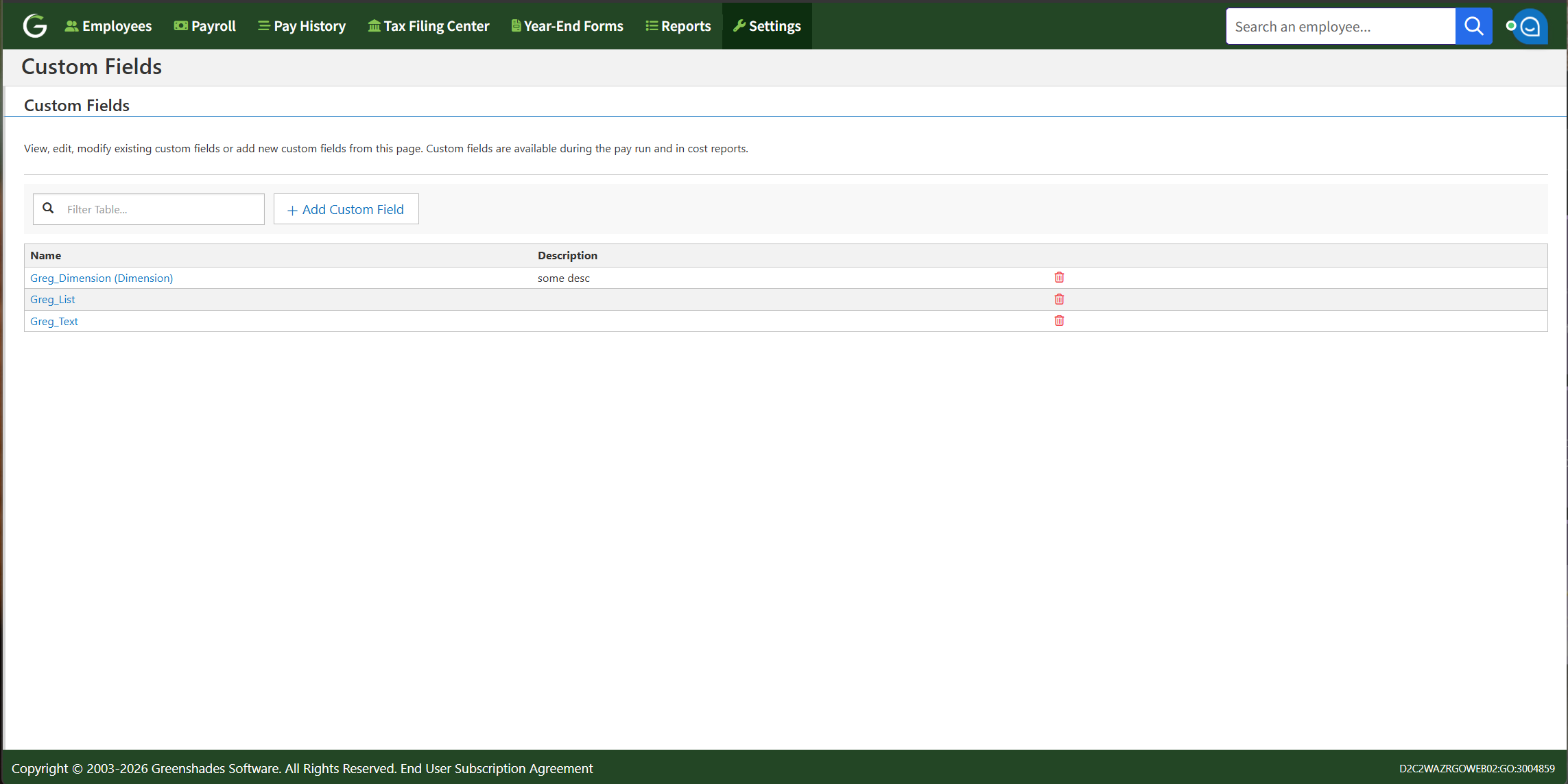
Greenshades supports custom fields at three different levels, and understanding what each one does is critical.
| Field type | Where it applies | Best used for |
|---|---|---|
| Payroll custom fields | Per earning, within the payroll run | Client, job, placement, GL dimension — anything that changes earning by earning |
| Timesheet custom fields | Entered by employee at clock-in or time submission | Capturing context at the moment work happens |
| Profile custom fields | Set at the employee level by an admin | Static data: home department, eligibility flags, credential level |
Payroll custom fields are the most important, and the only ones used, for transaction-level reporting. They attach directly to each earning, which means each line of pay can carry its own context independent of the others.
Within the Greenshades Pay Wizard, each earning line can have many custom fields assigned. Those fields can be configured as:
Once assigned, those field values appear in pay run reports, GL transaction reports, and Greenshades reporting exports. That means you can filter by client, sort by placement, or tie a specific earning directly to a GL dimension — without touching a spreadsheet.
Timesheet custom fields operate within Time & Labor. They capture context at the moment work happens and support reporting on the timesheet itself — but they're a separate layer from payroll. For businesses that capture time through Greenshades Time & Labor, employees can enter custom field data when they clock in or submit time — a patient name, a job reference, a facility code. That data supports reporting within the timesheet itself: filtering, searching, and reviewing time by whatever context matters for that shift.
Timesheet custom fields are built for the timesheet, not the paycheck. They live in a separate module from payroll custom fields and don't carry over automatically. If that same context needs to land on the earning — for billing, GL coding, or job costing — it has to be entered as a payroll custom field directly, or mapped in from an external time source.
When earnings carry transaction-level context, the downstream impact is significant. Here's what becomes possible that wasn't before.
Labor cost by client or job. Pull a report filtered by client name or job ID and see exactly what labor cost for that account — including overtime — without leaving your payroll system.
Billing from payroll data. For staffing firms, healthcare providers, and professional services businesses that bill clients based on hours worked, transaction-level data means invoices can be generated directly from payroll rather than reconciled against it.
GL alignment without manual journal entries. When custom fields tie to GL dimensions, payroll data flows into your general ledger with the correct cost allocation already applied. The accounting team stops doing data entry and starts doing analysis.
Search and filter across pay runs. Find every earning tied to a specific placement, project, or location — across multiple pay periods — in seconds.
The throughline in all of this: the data you were previously building by hand in a spreadsheet is now a byproduct of how payroll processes. The manual work doesn't get faster — it disappears.
Custom fields solve a real problem across multiple industries, but the specifics vary.
Staffing is the primary use case. Employees frequently work multiple placements in a single pay period, and each placement needs to be billed to the right client. Greenshades custom fields allow each earning to carry a Placement ID, which supports both client billing and placement-level reporting. For agencies running on Bullhorn, Avionte, or similar platforms, the Placement ID flows in automatically via integration.
Nurses and clinical staff often work shifts across multiple facilities or care settings within the same pay period. Custom fields allow each earning to be tagged with a facility name, patient identifier, or care unit. This supports cost tracking at the facility or department level and gives finance teams visibility into labor costs across sites.
Construction businesses need to know what each job site costs in labor — not just what workers earned in total. Custom fields enable job-level cost tracking within payroll, so project managers and finance teams can see labor costs per job without manual allocation after the fact.
For consulting firms, agencies, and service businesses that bill by the hour, custom fields tie each earning to the client or project being served. That makes it possible to generate invoices from payroll data and understand profitability at the client or engagement level.
Learn more about Greenshades custom fields and cost accounting here.
Transaction-level tracking for reporting, billing, and labor cost visibility across complex industries.
Request A DemoYes. Greenshades supports multiple earnings per employee within a single pay run, and each earning can carry its own custom field value. That means a staffing employee working three placements in one week can have each portion of their pay tagged with the correct Placement ID — all within a single paycheck.
Greenshades supports three types of custom fields: payroll custom fields (applied per earning within the Pay Wizard), timesheet custom fields (entered by employees at clock-in for reporting within Time & Labor), and profile custom fields (set at the employee level for static data). Payroll custom fields can be configured as dropdowns, open text fields, or GL dimensions.
Not from Greenshades Time & Labor — timesheet custom fields are built for reporting within the timesheet itself and stay in that module. If you use an external time provider, though, field values such as Placement IDs can be mapped into payroll custom fields automatically during import, as with a Bullhorn integration — no manual entry required.
Yes. Greenshades supports GL dimension custom fields that tie directly to preconfigured accounting dimensions. When an earning carries a GL dimension value, that data flows into GL transaction reports and can be used to drive accurate cost allocation in your general ledger or ERP without additional manual journal entries.
Note: This information is for informational purposes only and does not constitute formal tax, legal, or compliance advice. Always consult with qualified tax advisors, legal counsel, and your organization's internal teams for guidance specific to your situation. Additional regulations may apply. For the most accurate and up-to-date information, refer to official government resources and regulatory agencies.
Get the latest updates from our company by subscribing to our newsletter. Stay up-to-date with our content, receive news about our products, and gain industry insights from our experts. Don't miss out on this valuable resource - sign up today!
By subscribing to our email updates, you agree with our Privacy Policy.