






















A tax engine built in the Microsoft ecosystem. A payroll platform built for whatever comes next.
If you’ve run payroll inside Dynamics GP, you already know the workarounds. Complex pay rules require extra steps. Multi-entity setups push the system’s limits. And somewhere in the background, the question of what comes next is getting harder to ignore.
Greenshades didn’t start as a GP competitor. It started as a tax engine built specifically for GP users — and over the past two decades, it grew into a full payroll, HR, and tax compliance platform that works for any business, not just Microsoft shops. That history matters when it comes time to make a change.
What Microsoft Dynamics GP was built for
Dynamics GP is a comprehensive business management suite. It covers a lot of ground: accounting, order processing, inventory management, CRM, manufacturing, project management, HR, payroll, business intelligence, and reporting — all under one roof.
For mid-market organizations managing complex operations across multiple functions, GP has been a reliable backbone. It handles finances, operations, and customer relationships in a way that drives real efficiency. That’s not nothing — and it’s why so many organizations have stayed on it for as long as they have.
Where it runs into difficulty is at the edges of its payroll module — particularly for organizations that have grown more complex, or that need to move their ERP infrastructure forward.
When GP payroll stops working for your business
GP’s payroll module has served as a dependable solution for straightforward payroll and HR needs. The limitation shows up when organizations start to scale — or when their requirements get more complex than the module was designed to handle.
There’s also an ERP dependency built in. GP payroll is designed to work within the Microsoft ecosystem. That means if you eventually move to a different ERP — cloud-based or otherwise — you’ll be switching payroll providers at the same time. Doing both at once is a significant lift, and it’s one that organizations often don’t anticipate until they’re already in the middle of it.
Greenshades solves this directly. Because it maintains a bidirectional integration with GP, you can move your payroll to Greenshades without touching your ERP. Your GP system keeps running exactly as it does today — the payroll just happens somewhere better.
Key point
Greenshades maintains a bidirectional sync with Dynamics GP. That means you can modernize your payroll without changing your ERP — now, or while you figure out your longer-term infrastructure path.
How Greenshades works with Dynamics GP
Greenshades was founded as a Microsoft partner. The original product was a tax engine purpose-built for GP — which means the team has deep institutional knowledge of GP data structures, tax code mappings, and how GP shops are organized.
Over the past two decades, that tax engine grew into a full payroll, HR, and compliance platform serving over 4,000 businesses across staffing, healthcare, construction, transportation, and beyond. Throughout that, Greenshades has maintained is the bidirectional integration with GP, so the transition for GP users is genuinely smooth.
When questions come up during implementation, you’re talking to people who already know what your GP codes mean. That’s a different conversation than explaining your setup from scratch.
Learn more about the Greenshades and Microsoft GP integration.
How Greenshades handles payroll tax compliance
GP's tax tables are no longer being updated properly — and third-party consultants can patch around that, but they can't fix the underlying calculation problems. It's an expensive way to manage a compliance risk that doesn't actually go away.
The reality is, payroll accuracy lives or dies on tax calculation — and the math is more complex than it looks. Federal income tax withholding, FICA, state and local taxes, paid sick leave, shift differentials, blended overtime: each has its own rules, and they interact. Greenshades' tax engine is built to handle all of it.
On the federal withholding side, the engine is benchmarked against IRS Publication 15-T and calibrated to produce results within pennies of IRS expectations. More broadly, the engine evaluates pay history on an ongoing basis, identifying over- or under-withholding gaps before they compound — keeping compliance current without waiting for year-end to surface the problem.
Quarter close is a single-system process: fix something in payroll and it flows automatically to tax. And when something does need attention, payroll support and tax support are on the same team — so tickets get resolved, not bounced.
There's also the Adjustments tool. If a pay run was processed incorrectly, you can go back, identify what it should have been, and true up the delta using existing data. It's a rare capability, and one that matters when complexity is the norm rather than the exception.
Direct answer
How do I know if my payroll system is keeping up with tax compliance?
A few things to look for: tax tables that update automatically, a calculation engine benchmarked against IRS Publication 15-T for federal withholding, and built-in logic for FICA, state and local taxes, and payroll complexity like shift differentials and blended overtime. Your system should also monitor pay history on an ongoing basis — catching over- or under-withholding before it becomes a year-end problem, not after. If any of those are gaps, they're worth addressing before they compound.
What you actually get with Greenshades payroll
Beyond the tax accuracy, here’s what the platform delivers for organizations coming from GP:
- Flexibility on your schedule. Run payroll when you need to, with unlimited pay runs at no extra cost. Configure pay codes to match your actual payroll rules — complex shifts, blended overtime, multiple locations, intricate withholdings. No workarounds required.
- Open API. Connect to your ERP, timekeeping system, or other business tools without being locked into a single ecosystem. That flexibility is how Greenshades works alongside GP today — and how it works with Business Central, Sage Intacct, or whatever comes next.
- Employee self-service. Employees can access pay stubs, tax forms, and documents through the Green Employee portal. Payment options include paper check, direct deposit, or banking integrations — reducing the admin burden on your payroll team.
- A single end-to-end workflow. The payroll wizard walks through the entire process in one place, automatically calculating location-specific tax withholdings in compliance with FLSA guidelines. No pop-up windows. No extra navigation.
- Compliance that stays current. Federal, state, and local tax rates are maintained automatically. FLSA, ACA — the compliance landscape keeps changing, and the platform keeps up without requiring you to manage it manually.
How to migrate payroll from Dynamics GP to Greenshades
The implementation concern is real, and worth addressing directly: pay history migration is typically the heaviest lift when changing payroll systems. With Greenshades, it’s largely automated.
Greenshades’ connectors tool pulls GP data with no need for manual Excel exports or any retyping years of pay history. Mapping conversations still happen — this is faster, not zero-effort. But the burden on your team is genuinely lower than a typical migration, and for organizations already using Greenshades for tax filing, some data already exists in the system, which reduces setup even further.
How it played out for Agape of Appleton
reduction in payroll processing time for Agape of Appleton, after migrating from GP to Greenshades
Agape of Appleton is a provider of housing and services for people with disabilities. They had used Greenshades’ tax services since the early 2000s. With limited updates in GP and lack of new features, they needed a more reliable and efficient solution to ensure business continuity and meet their evolving needs.
Since adopting the full suite of Greenshades solutions, Agape of Appleton has transformed its operations. Payroll processing time dropped 75% — from nearly two full days to half a day. The platform handles staff position tracking, hours worked, and open enrollment in a single workflow, accessible to staff who aren’t technically inclined.
“Greenshades has been a trusted partner for Agape of Appleton since the early 2000s… significantly streamlining our payroll and HR processes, reducing manual paperwork, and making the platform accessible even for our non-tech-savvy staff.”
Gia Mathos Lamm, Chief Financial Officer — Agape of Appleton
Greenshades has proven to be a trusted partner, supporting Agape's mission to provide quality care and services while future-proofing their business operations. Read the full Agape of Appleton case study.
If you’re also evaluating your ERP path
The ERP decision and the payroll decision often get tangled together. They don’t have to be.
Because Greenshades maintains a bidirectional integration with GP, you can move payroll now without disrupting your ERP. When you’re ready to make a move on the ERP side, Greenshades has native GL sync integrations with both Microsoft Dynamics 365 Business Central and Sage Intacct. For any other ERP, GL dimension mapping with export/import is available and fully functional.
The practical point: your payroll decision doesn’t have to wait on your infrastructure decision.
Microsoft Dynamics GP end of life: what it means for payroll
Microsoft has ended new development on Dynamics GP — all versions reach full sunset by 2029. As of today, tax tables are no longer being updated correctly, and the underlying federal income tax methodology isn’t being fixed. Third-party consultants can apply patches, but they can’t repair the math the system is built on.
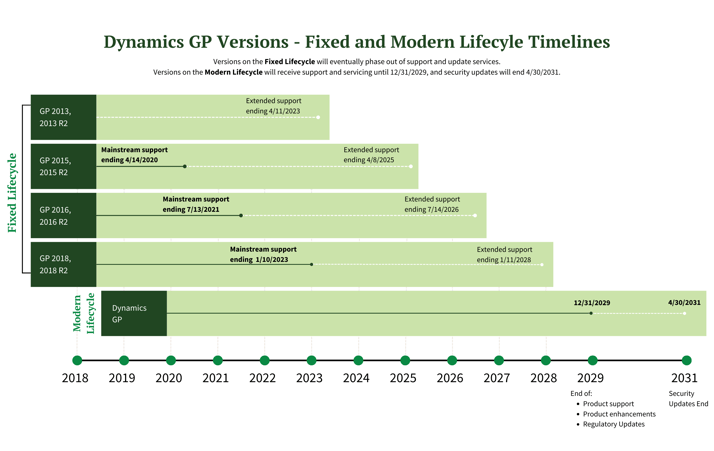
The question isn’t whether to move — it’s when, and who you move with. For organizations that have run on GP, Greenshades has the integration history, the implementation expertise, and the compliance infrastructure to make that transition the least disruptive version of a move that needs to happen anyway.
Ready to move off GP?
See how Greenshades handles the transition — pay history migration, tax compliance, bidirectional GP sync, and ongoing support.
Schedule a DemoNote: This information is for informational purposes only and does not constitute formal tax, legal, or compliance advice. Always consult with qualified tax advisors, legal counsel, and your organization’s internal teams for guidance specific to your situation. Additional regulations may apply. For the most accurate and up-to-date information, refer to official government resources and regulatory agencies.
Frequently asked questions
Can I move payroll to Greenshades without changing my ERP?
Yes. Greenshades maintains a bidirectional integration with Dynamics GP. You can migrate payroll to Greenshades while keeping GP as your ERP — the two systems continue to sync. This lets you address your payroll compliance situation now without being forced to make an ERP decision at the same time.
How long does it take to migrate payroll from GP to Greenshades?
Timeline varies by company size and complexity, but pay history migration — typically the biggest obstacle — is largely automated through Greenshades’ connectors tool, which pulls GP data via API without requiring manual exports. For organizations already using Greenshades for tax filing, the process is faster still.
Does Greenshades integrate with Business Central or Sage Intacct?
Yes. Greenshades has direct native GL sync integrations with both Microsoft Dynamics 365 Business Central and Sage Intacct. For other ERPs, GL dimension mapping with export/import functionality is available.
Why is Greenshades a better fit for GP users than other payroll providers?
Greenshades started as a tax engine built for GP and has maintained a bidirectional integration with the platform for over two decades. The implementation team has deep knowledge of GP data structures, tax code mappings, and pay codes — which reduces the back-and-forth that slows down migrations with vendors who don’t know the system.